导航
×
   ❮   
HTML CSS JavaScript PHP Python C C++ Go Sass W3C Colors TypeScript ECMS

Python 教程

Python 简介 Python 历史 Python 下载安装配置 Python 入门 Python 语法 Python 语句 Python 输出 Python 注释 Python 变量 Python 数据类型 Python 数值类型 Python 类型转换 Python 字符串 Python 布尔值 Python 运算符 Python 列表 Python 元组 Python 集合 Python 字典 Python If...Else Python While 循环 Python For 循环 Python 函数 Python Range Python 数组 Python 类和对象 Python 继承 Python 迭代 Python 模块 Python 日期时间 Python 数学运算 Python JSON Python 正则表达式 Python PIP Python Try...Except Python 用户输入 Python 字符串格式化

Python 文件处理

Python 文件处理 Python 打开文件 Python 创建/写入文件 Python 删除文件

Python NumPy

NumPy 简介 NumPy 入门 NumPy 创建数组 NumPy 数组索引 NumPy 数组裁切 NumPy 数据类型 NumPy 副本 vs 视图 NumPy 数组形状 NumPy 数组重塑 NumPy 数组迭代 NumPy 数组连接 NumPy 数组拆分 NumPy 数组搜索 NumPy 数组排序 NumPy 数组过滤 NumPy 随机数 NumPy ufunc 通用函数

Python SciPy

SciPy 简介 SciPy 入门 SciPy 常量 SciPy 优化器 SciPy 稀疏数据 SciPy 图表 SciPy 空间数据 SciPy Matlab 数组 SciPy 插值 SciPy 统计显着性检验

Python 机器学习

Machine 机器学习入门 Machine 平均中位数模式 Machine 标准差 Machine 百分位数 Machine 数据分布 Machine 正态数据分布 Machine 散点图 Machine 线性回归 Machine 多项式回归 Machine 多元回归 Machine 缩放 Machine 训练/测试 Machine 决策树

Python MySQL

MySQL 入门 MySQL Create Database MySQL Create Table MySQL Insert MySQL Select MySQL Where MySQL Order By MySQL Delete MySQL Drop Table MySQL Update MySQL Limit MySQL Join

Python MongoDB

MongoDB 入门 MongoDB 创建数据库 MongoDB 创建集合 MongoDB 插入 MongoDB 查找 MongoDB 查询 MongoDB 排序 MongoDB 删除 MongoDB 删除集合 MongoDB 更新 MongoDB 限制

Python 参考手册

Python 参考手册 Python 内置函数 Python 字符串方法 Python 列表/数组方法 Python 字典方法 Python 元组方法 Python 集合方法 Python 文件方法 Python 关键字 Python 内置异常 Python 词汇表
Python 词汇表 Indentation Multi Line Comments Creating Variables Variable Names Output Variables String Concatenation Global Variables Built-In Data Types Getting Data Type Setting Data Type Numbers Int Float Complex Random Number Specify a Variable Type String Literals Assigning a String to a Variable Multiline Strings Strings are Arrays Slicing a String Negative Indexing on a String String Length Check In String Format String Escape Characters Evaluate Booleans Return Boolean Value Comparison Operators Identity Operators Access List Items Change List Item Loop Through List Items Check if List Item Exists List Length Add List Items Remove List Items Copy a List Join Two Lists Access Tuple Items Change Tuple Item Loop List Items Check if Tuple Item Exists Tuple Length Tuple With One Item Remove Tuple Items Join Two Tuples 访问集合项 添加集合项目 Loop Set Items 检查集合项是否存在 集合长度 删除集合项 连接两个集合 Access Dictionary Items Change Dictionary Item Loop Dictionary Items Check if Dictionary Item Exists Dictionary Length Add Dictionary Item Remove Dictionary Items Copy Dictionary Nested Dictionaries If Statement If 缩进 Elif Else 简写 If Else If AND If OR 嵌套 If If中的pass关键字 While While Break While Continue While Else Loop Through a String For Break For Continue Looping Through a rangee For Else Nested Loops For pass Call a Function *args Keyword Arguments *kwargs Default Parameter Value Passing a List as an Argument Function Return Value The pass Statement i Functions Function Recursion Why Use Lambda Functions Array What is an Array Array Length Looping Array Elements Add Array Element Remove Array Element Array Methods Class Create Class The Class __init__() Function Object Methods self Modify Object Properties Delete Object Properties Delete Object Class pass Statement Create Parent Class Create Child Class Create the __init__() Function Add Class Properties Add Class Methods Iterator vs Iterable Loop Through an Iterator Create an Iterator StopIteration Global Scope Global Keyword Create a Module Variables in Modules Renaming a Module Built-in Modules Using the dir() Function Import From Module Date Output Create a Date Object The strftime Method Date Format Codes Parse JSON Convert into JSON Format JSON Sort JSON RegEx Functions Metacharacters in RegEx RegEx Special Sequences RegEx Sets RegEx Match Object Install PIP PIP Packages PIP Remove Package Error Handling Try Else Try Finally raise Comments Assign Values to Multiple Variables Type Conversion Boolean Values Operators Arithmetic Operators Assignment Operators Logical Operators 成员运算符 Bitwise Operators Lists Tuple 集合 Dictionary 简写 If For Function Function Arguments Lambda Function super Function Iterators Datetime Module JSON RegEx Module Handle Many Exceptions Access Arrays

Python 模块参考

Python 内置模块 Python random 随机模块 Python requests 请求模块 Python statistics 统计模块 Python math 数学模块 Python cMath 模块

Python 如何使用

Python 删除列表重复项 Python 反转字符串 Python 添加两个数字

Python 实例

Python 实例 Python 测验

机器学习 - 多项式回归


多项式回归(Polynomial Regression)

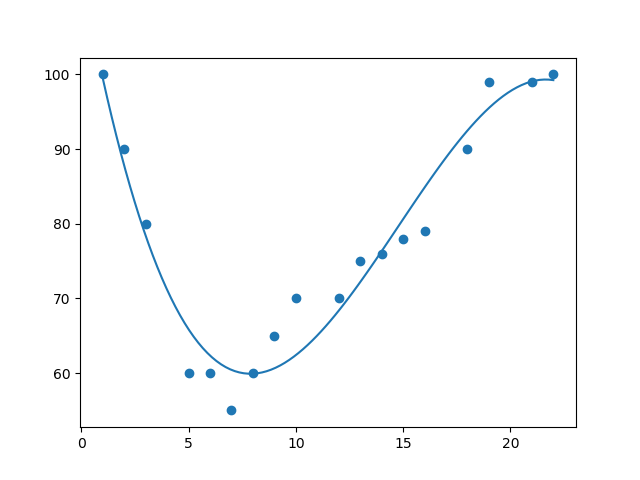
如果您的数据点显然不适合线性回归(穿过数据点之间的直线),那么多项式回归可能是理想的选择。

像线性回归一样,多项式回归使用变量 x 和 y 之间的关系来找到绘制数据点线的最佳方法。

工作原理

Python 有一些方法可以找到数据点之间的关系并画出多项式回归线。我们将向您展示如何使用这些方法而不是通过数学公式。

在下面的例子中,我们注册了 18 辆经过特定收费站的汽车。

我们已经记录了汽车的速度和通过时间(小时)。

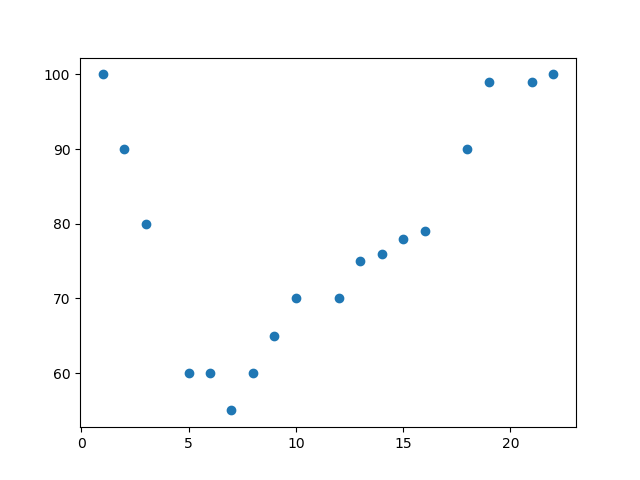
x 轴表示一天中的小时,y 轴表示速度:

实例

首先绘制散点图:

import matplotlib.pyplot as plt

x = [1,2,3,5,6,7,8,9,10,12,13,14,15,16,18,19,21,22]
y = [100,90,80,60,60,55,60,65,70,70,75,76,78,79,90,99,99,100]

plt.scatter(x, y)
plt.show()

结果:
运行实例 »

实例

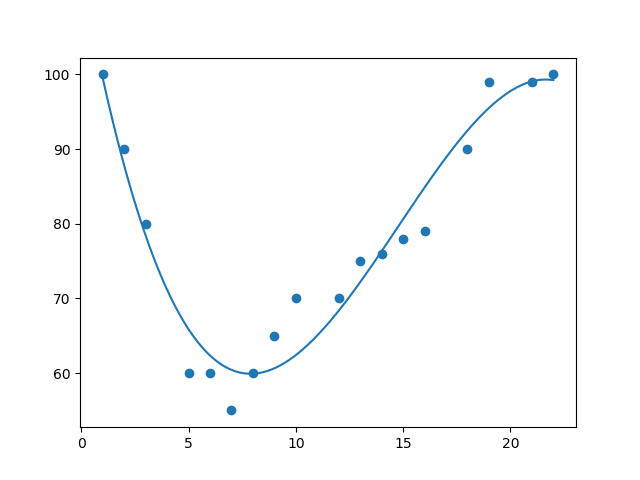
导入 numpy 和 matplotlib ,然后画出多项式回归线:

import numpy
import matplotlib.pyplot as plt

x = [1,2,3,5,6,7,8,9,10,12,13,14,15,16,18,19,21,22]
y = [100,90,80,60,60,55,60,65,70,70,75,76,78,79,90,99,99,100]

mymodel = numpy.poly1d(numpy.polyfit(x, y, 3))

myline = numpy.linspace(1, 22, 100)

plt.scatter(x, y)
plt.plot(myline, mymodel(myline))
plt.show()

结果:
运行实例 »

实例解析

导入所需模块:

import numpy
import matplotlib.pyplot as plt

创建表示 x 和 y 轴值的数组:

x = [1,2,3,5,6,7,8,9,10,12,13,14,15,16,18,19,21,22]
y = [100,90,80,60,60,55,60,65,70,70,75,76,78,79,90,99,99,100]

NumPy 有一种方法可以让我们建立多项式模型:

mymodel = numpy.poly1d(numpy.polyfit(x, y, 3))

然后指定行的显示方式,我们从位置 1 开始,到位置 22 结束:

myline = numpy.linspace(1, 22, 100)

绘制原始散点图:

plt.scatter(x, y)

画出多项式回归线:

plt.plot(myline, mymodel(myline))

显示图表:

plt.show()


R-Squared

重要的是要知道 x 轴和 y 轴的值之间的关系有多好,如果没有关系,则多项式回归不能用于预测任何东西。

该关系用一个称为 r 平方( r-squared)的值来度量。

r 平方值的范围是 0 到 1,其中 0 表示不相关,而 1 表示 100% 相关。

Python 和 Sklearn 模块将为您计算该值,您所要做的就是将 x 和 y 数组输入:

实例

我的数据在多项式回归中的拟合度如何?

import numpy
from sklearn.metrics import r2_score

x = [1,2,3,5,6,7,8,9,10,12,13,14,15,16,18,19,21,22]
y = [100,90,80,60,60,55,60,65,70,70,75,76,78,79,90,99,99,100]

mymodel = numpy.poly1d(numpy.polyfit(x, y, 3))

print(r2_score(y, mymodel(x)))
运行实例 »

注释: 结果 0.94 表明存在很好的关系,我们可以在将来的预测中使用多项式回归。


预测未来值

现在,我们可以使用收集到的信息来预测未来的值。

例如:让我们尝试预测在晚上 17 点左右通过收费站的汽车的速度:

为此,我们需要与上面的实例相同的 mymodel 数组:

mymodel = numpy.poly1d(numpy.polyfit(x, y, 3))

实例

预测下午 17 点过车的速度:

import numpy
from sklearn.metrics import r2_score

x = [1,2,3,5,6,7,8,9,10,12,13,14,15,16,18,19,21,22]
y = [100,90,80,60,60,55,60,65,70,70,75,76,78,79,90,99,99,100]

mymodel = numpy.poly1d(numpy.polyfit(x, y, 3))

speed = mymodel(17)
print(speed)
运行实例 »

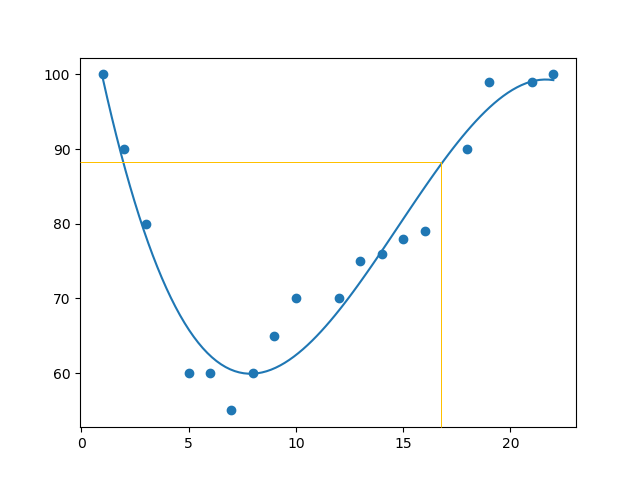
该例预测速度为 88.87,我们也可以在图中看到:


糟糕的拟合度?

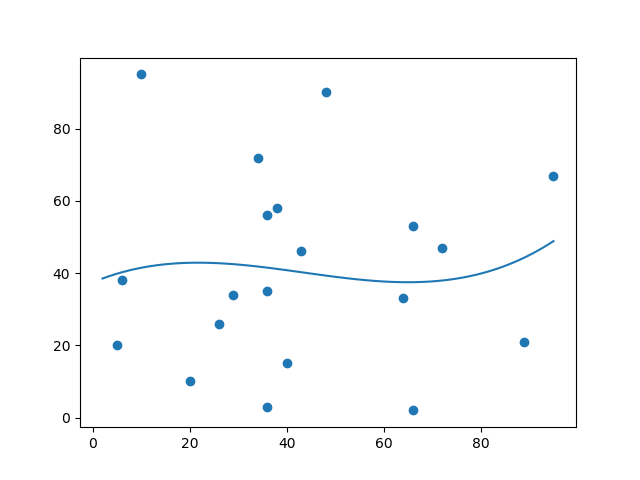
让我们创建一个实例,其中多项式回归不是预测未来值的最佳方法。

实例

x 和 y 轴的这些值会导致多项式回归的拟合度非常差:

import numpy
import matplotlib.pyplot as plt

x = [89,43,36,36,95,10,66,34,38,20,26,29,48,64,6,5,36,66,72,40]
y = [21,46,3,35,67,95,53,72,58,10,26,34,90,33,38,20,56,2,47,15]

mymodel = numpy.poly1d(numpy.polyfit(x, y, 3))

myline = numpy.linspace(2, 95, 100)

plt.scatter(x, y)
plt.plot(myline, mymodel(myline))
plt.show()

结果:
运行实例 »

r-squared 值呢?

实例

您应该得到一个非常低的 r-squared 值。

import numpy
from sklearn.metrics import r2_score

x = [89,43,36,36,95,10,66,34,38,20,26,29,48,64,6,5,36,66,72,40]
y = [21,46,3,35,67,95,53,72,58,10,26,34,90,33,38,20,56,2,47,15]

mymodel = numpy.poly1d(numpy.polyfit(x, y, 3))

print(r2_score(y, mymodel(x)))
运行实例 »

结果:0.00995 表示关系很差,并告诉我们该数据集不适合多项式回归。


Copyright ©2026 蒙ICP备2026009383号 All Rights Reserved 提供的内容仅用于学习和测试,不保证内容的正确性。